I'd like to introduce you to an incredible artist Nico di Mattia. Please take the time to check out this amazing artist who has a style all of his own "Digital Speed Painting" time well spent.
Nico di Mattia is an Argentinian artist and Photoshop user who received worldwide attention with his performances of “digital speed paintings” posted on his YouTube´s channel, which has thousands of subscribers and more than 45 million of views.
An example of Nico’s work: I'm a BIG fan of house.
Website: CLICK HERE
He currently directs and edits his own comic book and illustrators’ magazine and works as a freelance illustrator and caricaturist for different business, companies and private clients from all over world.
Showing posts with label Cool Tips. Show all posts
Showing posts with label Cool Tips. Show all posts
Wednesday, 17 November 2010

Thursday, 2 September 2010
Nature Sounds: check it out

If you're like me "scary thought" and you like the sounds of nature, such as a rainstorm
or forest sounds while you're at work on the computer, then you're going to LOVE this.
Some of you may remember me posting something similar Rainy Mood a few months back, well this one is is so much better. Nature Sounds lets you make your own composition of
nature sounds and then save it. You can save your composition as a link, for easy access
or download your composition as a "WAV" file, which you can always convert to MP3 or a file of your choice later.
When you visit, you'll see a box in the middle with 4 sliders and each has its own dropdown
box, from these dropdown boxes you can select sounds such as rain,storms,thunder,snow,
wind in leaves,creek,fire,waterfall and beach, then in another dropdown box, you can add other sounds such as birds,owls,crickets and so much more,there are 29 different sounds to choose from.
Here's a link to a mix I made Good Nights Sleep { http://naturesoundsfor.me/Good-Nights-Sleep }which I put a different sound in each of the four dropdown boxes and saved as a link and also downloaded it as a Wav file to convert to MP3 and loop it continuously then record it to CD to play for a relaxing night of sleep.
Check it out Nature Sounds [ http://naturesoundsfor.me/ ]
Wednesday, 28 July 2010
Pearltrees, Organize, Discover and Share Bookmarks Neatly
I just found out about this remarkable tool, so I jumped at the offer and thought I would pass this on to you, my friends, thinking it may be of use and a new way to organize/bookmark the things you discover very neatly.
As a blogger, I tend to collect bookmarks like crazy, always looking for new ideas and inspiration from all over the world wide web from the cozy comfort of my over stuffed desk chair. If you're anything like me "heaven forbid" your bookmarks are clumsy and unorganized to say the least.
Help is on the way and it's called Pearltrees.
Pearltrees is the social way to organize, discover and share the stuff you like on the Web. Use Pearltrees to keep at hand the stuff you find everyday on the Web, to discover new stuff in your areas of interest and to drive people through your web. Check out the video below and decide for yourself.
As a blogger, I tend to collect bookmarks like crazy, always looking for new ideas and inspiration from all over the world wide web from the cozy comfort of my over stuffed desk chair. If you're anything like me "heaven forbid" your bookmarks are clumsy and unorganized to say the least.
Help is on the way and it's called Pearltrees.
Pearltrees is the social way to organize, discover and share the stuff you like on the Web. Use Pearltrees to keep at hand the stuff you find everyday on the Web, to discover new stuff in your areas of interest and to drive people through your web. Check out the video below and decide for yourself.
Wednesday, 2 June 2010
PicPick "A Must Have Free Tool"
Thought I would pass on a incredible free tool that I use daily and would be lost without it.
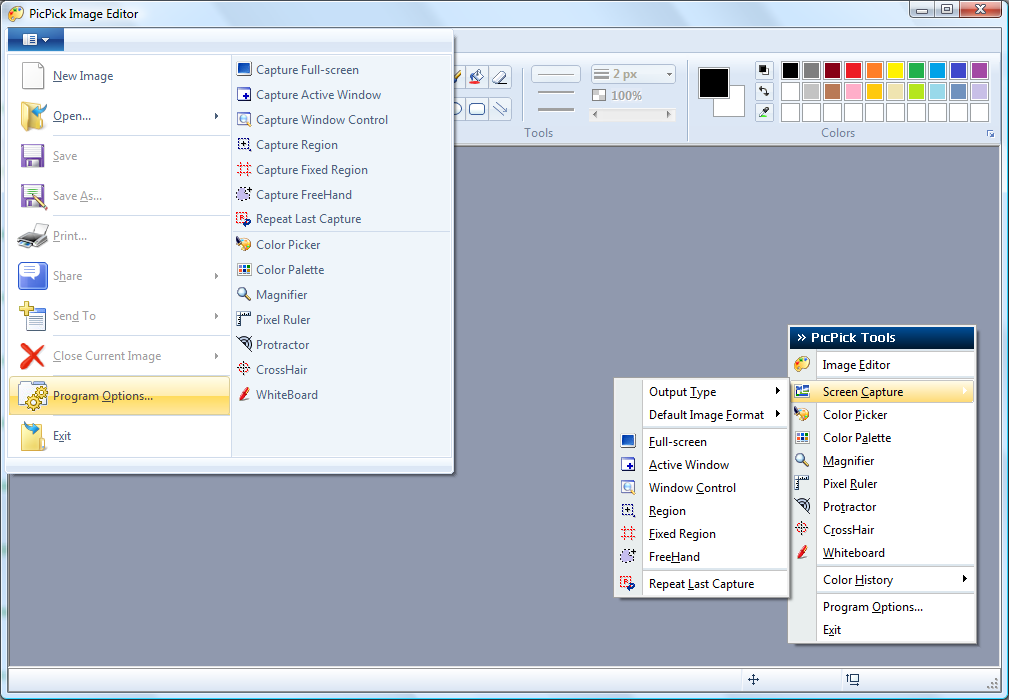
Click image for better view
PicPick is user friendly and full of features for creating your image,
suitable for software developers, graphic designers and home user.
It is an all-in-one program that provides full-featured screen capture tool,
intuitive image editor, color picker, color palette, pixel ruler, protractor,
crosshair and even whiteboard.
It has not only everything what you need, but it loads fast, sits quietly in
the system tray until needed.
Furthermore, this software is distributed as freeware. So you may use this
software on any number of computers for as long as you like.
Check it out and download HERE.
suitable for software developers, graphic designers and home user.
It is an all-in-one program that provides full-featured screen capture tool,
intuitive image editor, color picker, color palette, pixel ruler, protractor,
crosshair and even whiteboard.
It has not only everything what you need, but it loads fast, sits quietly in
the system tray until needed.
Furthermore, this software is distributed as freeware. So you may use this
software on any number of computers for as long as you like.
Check it out and download HERE.
Thursday, 18 February 2010
Wordle

I would like to thank my friend Gretchen Thompson for this
cool web tool called Wordle, which she wrote about on her blog.
Wordle is a toy for generating “word clouds” from text that you provide.
The clouds give greater prominence to words that appear more frequently
in the source text. You can tweak your clouds with different fonts,
layouts, and color schemes. The images you create with Wordle are yours
to use however you like. You can print them out, or save them to the Wordle
gallery to share with your friends.
I've made a couple and use them as desktop wallpaper.
An Idiot’s Guide To Photoshop Part I & II Free PDFs

I thought this may be of some interest to those who are
new to Photoshop and maybe to some who seek to learn a
few new tricks.
The kind folks at MakeUseOf.com are proud to present
An Idiot’s Guide To Photoshop - Part I.
the starter’s manual for every Photoshop initiate to carry!
This guide starts right at the very bottom, assuming no knowledge at all,
and walks you through all basic aspects of the application. The guide
even comes with three full pages of shortcuts, cheat sheets covering all
the application’s possibilities!
new to Photoshop and maybe to some who seek to learn a
few new tricks.
The kind folks at MakeUseOf.com are proud to present
An Idiot’s Guide To Photoshop - Part I.
the starter’s manual for every Photoshop initiate to carry!
This guide starts right at the very bottom, assuming no knowledge at all,
and walks you through all basic aspects of the application. The guide
even comes with three full pages of shortcuts, cheat sheets covering all
the application’s possibilities!

Wednesday, 10 February 2010
Rainy Mood

Here's a site that does one thing, but does it very well Rainy Mood.com
I for one do most of my work at night, being a nocturnal and insomniac
person all my life, plus I love the sound of rain and thunderstorms and for some
odd reason I tend to be more creative with the nature accompaniment.
I just log on to Rainy Mood and open a new window and surf or work online
or open the site and work on my art offline with the soothing sounds in the background.
I for one do most of my work at night, being a nocturnal and insomniac
person all my life, plus I love the sound of rain and thunderstorms and for some
odd reason I tend to be more creative with the nature accompaniment.
I just log on to Rainy Mood and open a new window and surf or work online
or open the site and work on my art offline with the soothing sounds in the background.
Subscribe to:
Posts (Atom)